

SimpleTrends: A Sales and Revenue Dashboard Built for Small-Firm Architects
A $95 browser app that answers the one question your accounting system never quite gets to: How are we actually doing?
I have written before about building DSGNBDGT with Perplexity Computer. SimpleTrends is the sequel — a different problem, the same approach. This time the target wasn't design budgets. It was the bigger, blunter question every small-firm principal asks themselves on a slow Tuesday afternoon: How Are We Doing?
The Problem With "How Are We Doing?"
Your accounting system will tell you what you billed last month. It will tell you your accounts receivable. If you're disciplined, it might even tell you your overhead rate. What it will not tell you, at a glance, without you building a report first, is whether your sales — new work coming in the door — are keeping pace with your target revenue, the work you need to earn and bill every month projected into the future.
Those are two different lines. A firm can have a great revenue month while its sales pipeline is quietly drying up. A firm can also be sitting on a healthy backlog of sold work while revenue lags because the work simply hasn't started yet. Neither story shows up cleanly in a P&L. You have to go looking for it, and most small firms don't have the bandwidth to build that report every month.
I built SimpleTrends because I wanted that answer without having to go looking for it.
What SimpleTrends Actually Does
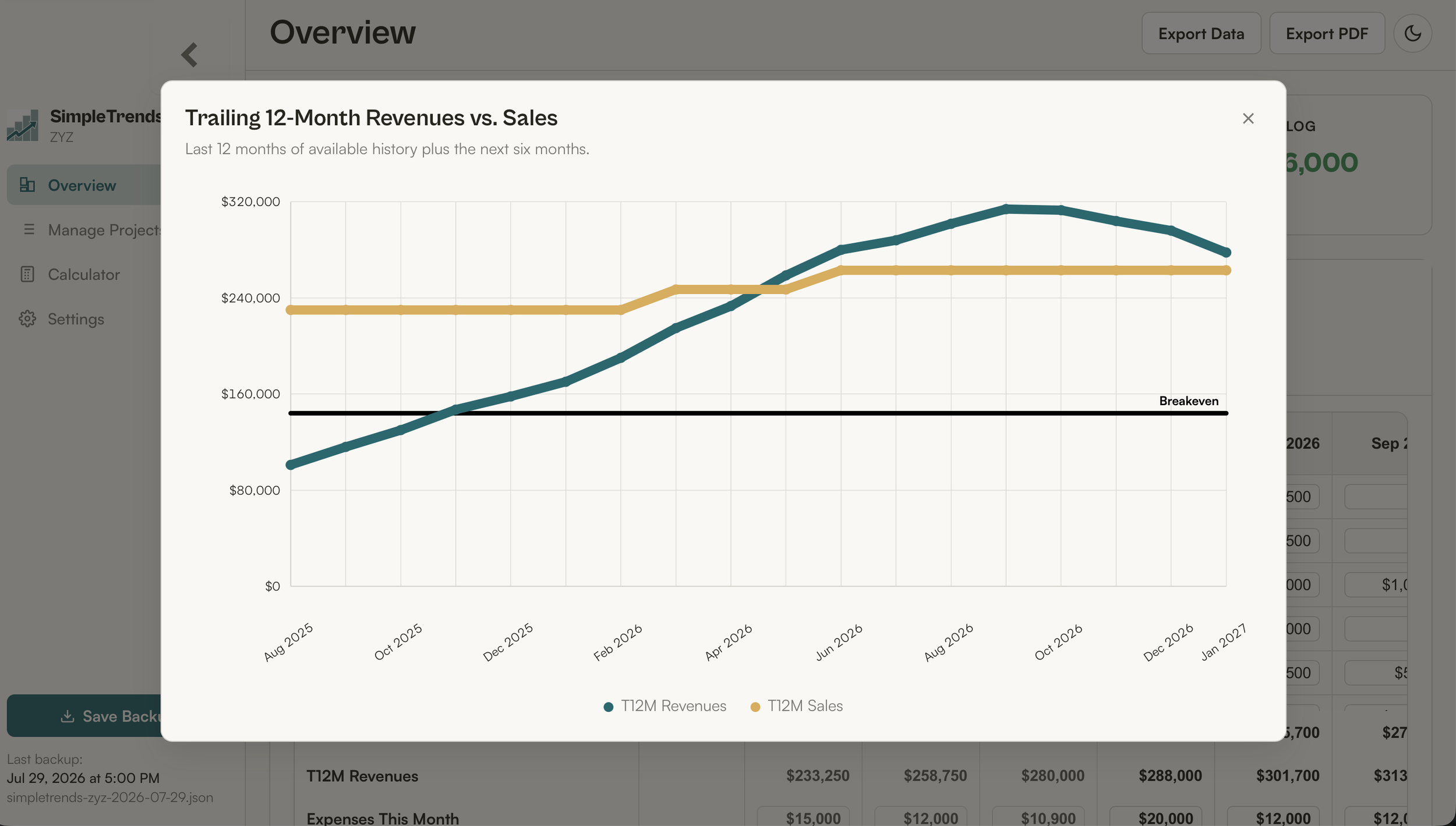
At its core, SimpleTrends tracks two numbers over time: sales — the net fee booked the moment you sign a project — and revenue — the fee actually earned, month by month, as the work gets done. It compares both against your firm's monthly overhead, and it rolls everything into a trailing twelve-month view so short-term noise doesn't drown out the real trend. And it projects that trend into the future based on data.
That sounds simple because it is. I built this the same way I built DSGNBDGT — starting from a spreadsheet I had cobbled together myself, then rebuilding it as a proper app with Perplexity Computer so it would actually be pleasant to use and easy to hand off to other firms. Full build story is here if you want the mechanics.
Here's what it gives you, in plain terms:
A dashboard you can read in ten seconds. Active project count and total fees, current and year-to-date profit/loss, trailing 12-month revenue and sales with trend indication, and your backlog — all on one screen.
A monthly grid that mirrors the spreadsheet logic most small firms already use informally, but with every fee balance and trend maintained for you.
A Fee Assignment Calculator to assist in allocating realistic earnings over the timeframe of a phase.
A trend chart plotting revenue against sales over the last twelve months plus the next six — the single view I check most often myself.
And you can print the Dashboard, export a CSV of your data, and export a full backup, so your data is never locked inside the app.
Why This Matters More Than It Looks Like It Should
It tells you if your backlog can support a new hire.
Backlog — the unearned fee balance sitting in your active projects — is the honest answer to "can we afford to bring someone on." Gut feel gets this wrong in both directions. SimpleTrends shows you the number.
It gives you a heads-up before things get bad, not after.
A slowing trailing-12-month sales line is the earliest warning signal a small firm gets that the pipeline needs attention. By the time revenue drops, you're already three to six months behind on fixing it. This app is built to surface that trend before it becomes a crisis.
It helps you juggle deadlines and manpower.
Seeing revenue and backlog side by side, project by project, makes it easier to see where you're overcommitted before a deadline forces the conversation.
It shows you the real impact of using contract staff.
Run a scenario through the Fee Assignment Calculator before you decide whether a project phase gets absorbed in-house or handed to a contractor, and you can see the impact on timeline instead of guessing at it.
It answers "how are we doing?" faster than your accounting system can.
Your bookkeeper's reports are accurate. They are also usually a few weeks behind and built for tax purposes, not trend-spotting. SimpleTrends is built for the second job.
What It Is Not
I'll be as direct here as I was about DSGNBDGT's limitations. SimpleTrends is not an accounting system — it doesn't do invoicing, payroll, or general ledger work, and it shouldn't replace whatever you use for that. It stores its data locally in your browser, not in the cloud, so there's no login and no multi-device sync out of the box; you're responsible for exporting a backup file periodically, and the User Guide that comes with it walks you through exactly how and why. If you need five people editing the same live data at once, this isn't that tool. If you need one principal or office manager with a clear read on the firm's trend line, it is exactly that tool.
How to Get It
SimpleTrends is a single-file browser app — no installation, no subscription, no recurring fee. Open it in Chrome, Edge, Safari, or Firefox and it works. It's priced at $95, one time, and it comes with a full user guide covering setup, data backups, and every feature described above.
Frequently Asked Questions
Is my data safe if I don't have the internet?
Yes — SimpleTrends runs entirely in your browser with no internet connection required after you've opened it once. That also means your data stays local to that browser and device, which is why the included User Guide walks you through exporting regular backups.
Do I need a Perplexity account or any subscription to use it?
No. SimpleTrends is a one-time $95 purchase with no subscription and no third-party account required to run it.
Can more than one person in my firm use it at the same time?
Not simultaneously on live data — it's built for a single administrator (typically a principal or office manager) tracking the firm's overall trend, not as a multi-user system.
How is this different from DSGNBDGT?
DSGNBDGT allocates design budgets and hours within a single project. SimpleTrends tracks sales, revenue, and profit trends across the whole firm over time. Many firms will eventually want both.
References
I Built an App. No, Really. — How I used Perplexity Computer to build a Design Budgeting app, and the honest caveats that came with it.
A Better Timekeeping App — Why timekeeping, not accounting, is the real engine room of small-firm profitability.
SimpleTrends Quick Start Guide(PDF) — The quick setup and how-to guide included with every download.